Find your MCP server's weak spots before attackers do
Samurai Security runs an authorized live security test against your own MCP server before you ship it. It checks whether a caller with no credentials, or the wrong ones, can reach your tools, whether the server's OAuth metadata and Origin handling are safe, and whether tool responses leak secrets, carry prompt injection or allow path traversal.
Seven attack classes, one run
Every run checks your server and each of its tools against the same seven attack classes, the ways a server facing AI agents you do not control is most often broken.
Authentication bypass
Calls each tool it tests with no credentials and reports any call the server should have refused. By default only read-only tools are called; an Admin can also include tools that change data (write mode).
Token forgery
Calls each tool it tests with the saved credential damaged into an inert value and checks that the server rejects it. By default only read-only tools are called; write mode adds tools that change data.
OAuth misconfiguration
Checks for a proper authentication challenge and that the URLs in your OAuth metadata are safe and match where they are published.
DNS rebinding
Sends a request with a foreign Origin header and checks that the server rejects it, as the MCP transport spec requires.
Secret exposure
Scans real tool responses for API keys, tokens and private keys. Only the secret type and a short prefix are kept.
Prompt injection
Scans real tool responses for text that tells an AI agent to ignore its instructions or leak credentials.
Path traversal
Sends a ../ traversal path to tools that take a file or path and checks that no system file comes back.
Built for the OWASP MCP Top 10
Every risk in the OWASP MCP Top 10, covered across live testing, static scanning, and governance — in one platform.
- risks covered
- 10
- tested live
- 5
- platform
- 1
- Live active test
- Static scan
- Compliance
- MCP01Token mismanagement and secret exposureLive active test
- MCP02Privilege escalation via scope creepStatic scan
- MCP03Tool poisoningStatic scan
- MCP04Supply chain and dependency tamperingStatic scan
- MCP05Command injection and executionLive active test
- MCP06Prompt injectionLive active test
- MCP07Insufficient authentication and authorizationLive active test
- MCP08Lack of audit and telemetryCompliance
- MCP09Shadow MCP serversCompliance
- MCP10Context injection and over-sharingLive active test
Every tool, every attack class, at a glance
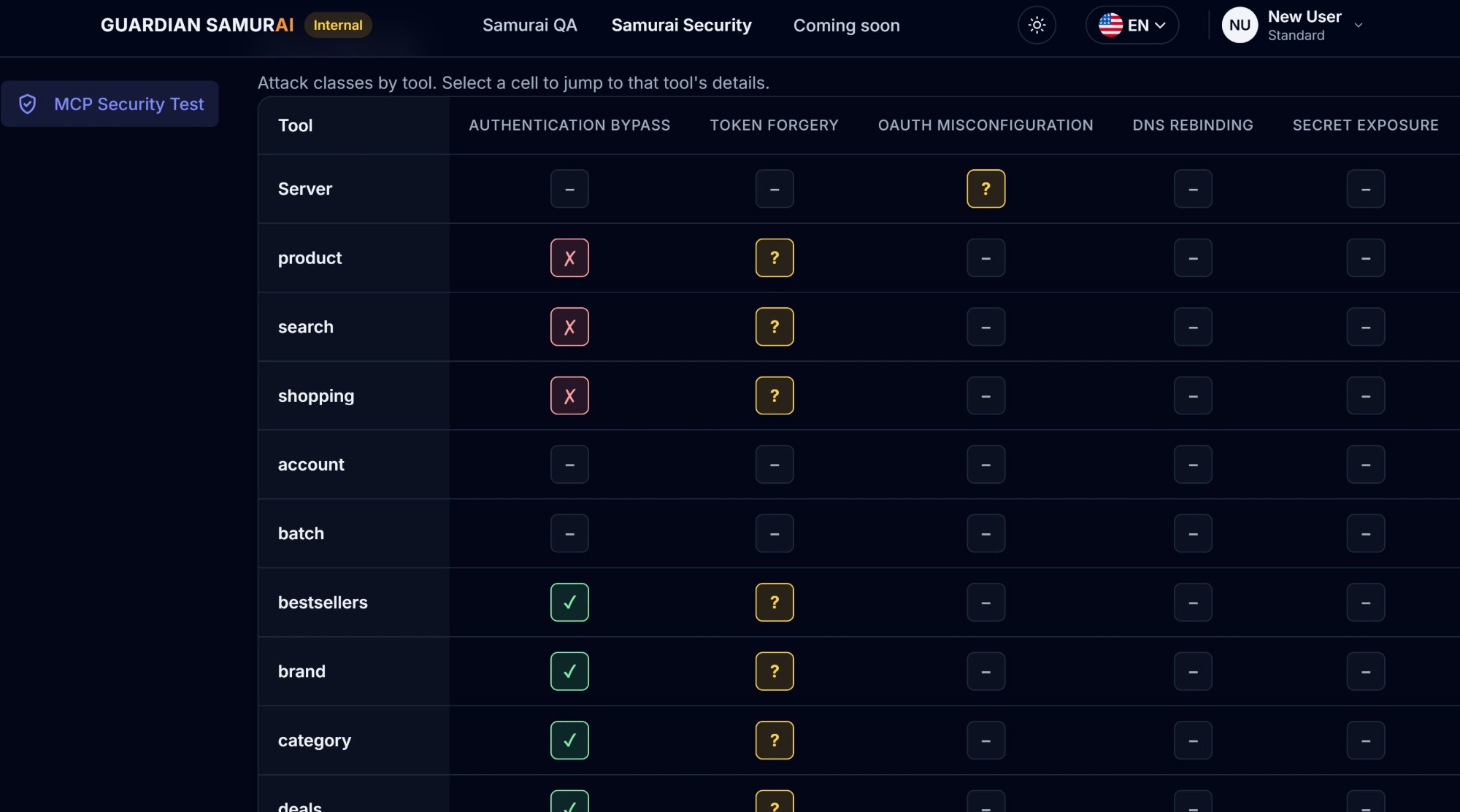
Each run ends with a matrix: your server and its tools down the side, the attack classes across the top. You can see where you are exposed before reading a single finding.
- Failed, passed, could not be verified or not applicable, in every cell
- The server row first, then the tools that failed, then the rest
- Select a cell to jump to that tool's details
A security plan you can review
Before you run anything, see every test grouped by attack class: what it applies to, exactly what we send, the findings it can report and whether it sends an attack payload. Download it to share with your reviewers.
Findings with a fix
The results detail lists each tool with the attack class, test, status, severity and what was found, plus a suggested fix for every failure.
Controls for your team
Only Admins and Security members can run a test. Everyone else on the team can still read the history and results, and every report records who authorized it.
Safe by design, and only on servers you own
The test is deterministic and by default only calls tools marked read-only, but it does send live requests, including a path-traversal attack payload. An Admin can opt in, per run, to also call tools that change data on a confirmed production server. Because it probes a live server, a few things must be in place first.
Standard plan or above
Samurai Security is part of the paid tiers above Samurai Quality, starting with Standard.
Terms accepted by an Admin
An Admin on your team accepts the Terms of Service once. Every report records who authorized it and when.
Your own registered server
You can only test a server saved in your account. Only an Admin or a Security member can run the test, and only on a server whose credentials they entered.